
Not Sure Where Your Money Goes? Put It In Once and See What's Left
Input your income, input your expenses, one row per entry. Your monthly and annual totals, the charts and what's left fill in. All in your own Google Sheet or Excel file, paid once.
- Where your money went, by category and month
- What's left this month and this year
- No bank login, nothing to disconnect
- Pay once, no subscription
Instant download • Works with Google Sheets & Excel • One-time payment
Works wherever you track your money
See Every Tab Before You Buy
Type an entry once. The month, the year and the dashboard fill in from it.


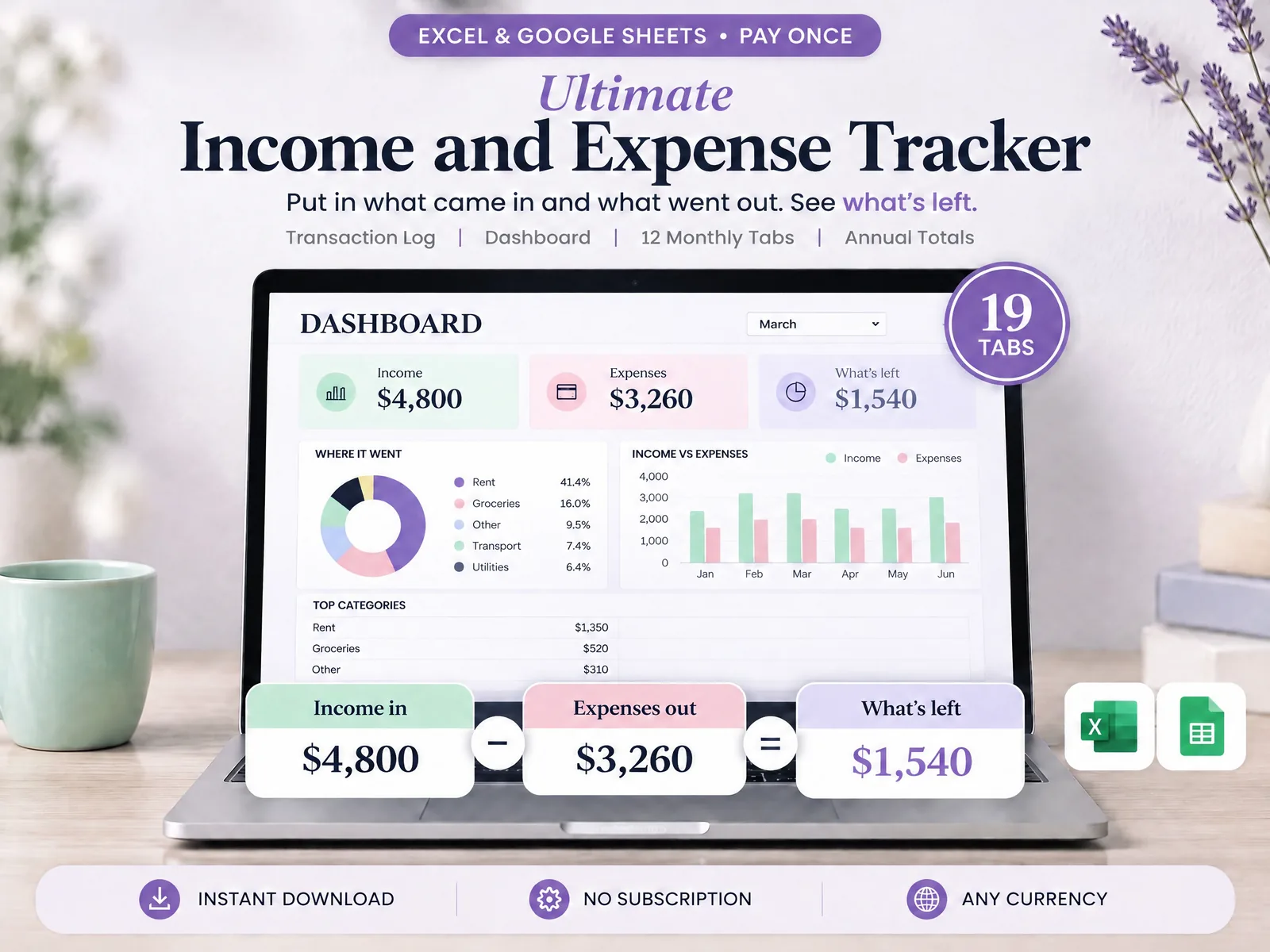
Income In, Expenses Out, See What's Left
Put in what came in and what went out. The totals and the graphs fill in, all in one connected file.
Transaction Log, One Row per Entry
Date, income or expense, category, description, amount. Put each one in once. The month fills itself from the date.
All-in-One Dashboard
Pick a month or the whole year. See income, expenses and what's left, spending by category, and income against expenses, with charts.
Annual Totals for the Whole Year
Every category month by month in one grid, with the year's income, expenses and what's left in each month.
12 Monthly Tabs, Start Any Month
January to December, each filled from the log: income and expenses by category, total in, total out and what's left.
Your Categories, Any Currency
Rename the preset income and expense categories and pick your currency symbol in Start Here. Typing each entry yourself makes it stick.
Google Sheets and Excel, Both Included
The same 19 tabs in both files. Open it in your browser on Mac or PC, or on your phone or tablet.
19 Tabs in Google Sheets and Excel, All Listed
Setup and Log (2 Tabs)
Start Here sets your currency, year, start month and categories in 3 steps. The Transaction Log takes one row per entry, and every other tab fills in from it.
Dashboard and Monthly Tabs (13 Tabs)
Income, expenses and what's left for the month you pick and for the year, with charts. Then January to December, each filled from the log. Start with any month.
Year View (4 Tabs)
Annual Totals, Income Sources, Bills and Subscriptions, and Year Compare. See each category month by month, every source of income, every repeating payment, and this year against last.
Also Included
Everything in the Ultimate Income and Expense Tracker
Every tab works in Google Sheets and Excel. Put each entry in once, and the totals fill in.
Start Here: Set Up Once in 3 Steps
Set your categories and currency, add each income and expense as one row, then check the Dashboard. Your settings live here: currency, the year, the start month, and your income and expense categories.
Transaction Log: Put It In Once
One row per entry: date, income or expense, category, description and amount. Type it or paste it once, and the month fills itself from the date. Every other tab reads from this one log.
Dashboard: See Where It Went
Pick a month or look at the whole year. Income, expenses and what's left sit up top. Spending by category shows where your money went, and a month-by-month chart puts income against expenses.
12 Monthly Tabs, January to December
Each month fills itself from the log. Start with any month of the year. Fell behind? Add the missed entries any time and the right month catches up. There is no streak to break.
Annual Totals: The Year in One Grid
Every category, month by month, in one grid. See the year's income, expenses and what's left, and what was left in each month, so you can compare one month with the next.

Income Sources: Where Your Money Comes From
Each source of income, such as your pay, side income and anything else, month by month and for the whole year. See the share each one brings in. It fills itself from the log.

Bills and Subscriptions: What Repeats
List each payment that repeats: rent, utilities, phone, streaming and insurance. Add the amount, how often it comes and the due day. See what repeats each month and each year.

Year Compare: This Year Against Last Year
Put this year next to last year, month by month. Compare income, expenses and what's left, and see the categories that went up most.
What Planner Lovers Are Saying
More than 100,000 happy customers: real reviews from real planners


Share It With Your Partner
Keep it for yourself, or share the Google Sheet. You both add rows to the same Transaction Log, and you both see the same totals.
Bonus Pages Plus a Sample and a Clean Copy
Both copies come in Google Sheets and Excel. The printable pages are for anyone who likes to write it down first.
BONUS PRINTABLE PAGES
2 PDF pages in US Letter and A4: a monthly income and expense log and a month summary. Write it down, then type it into the Transaction Log.
A SAMPLE COPY
Filled with a household's example month, so you can see how every tab works before you add your own numbers.
A CLEAN COPY
The same 19 tabs with no data in them. Set your categories and currency, and start with any month.
How It Works
The formulas are already built. You only add rows.
Set Up Once
Pick your categories and currency in Start Here
Add Each Entry
Each income and expense is one row
Totals Fill In
Monthly and annual totals, graphs and what's left
Check the Dashboard
See where it went at month end
Pay $9 Once and Keep the File
Everything on this page is in one download: Start Here, the Transaction Log, the Dashboard, 12 monthly tabs, Annual Totals, Income Sources, Bills and Subscriptions and Year Compare, plus the printable pages. Your own file. No subscription.
- Start Here and the Transaction Log (2 Tabs)
- Dashboard, Annual Totals and Year Compare (3 Tabs)
- 12 Monthly Tabs (start any month of the year)
- Income Sources, Bills and Subscriptions (2 Tabs)
- Google Sheets and Excel, Both Included
- A Sample Copy and a Clean Copy
Instant download • Google Sheets & Excel • No subscription • No bank login
This is a digital product with immediate access after purchase. No refunds on digital downloads.
No Subscription and Nothing to Disconnect
No bank login, and the screens don't change on you. Unlike a homemade sheet, the formulas are already built, and you can start in any month. Works on PC, Mac, phones and tablets.
Frequently Asked Questions
Everything you need to know before you buy